
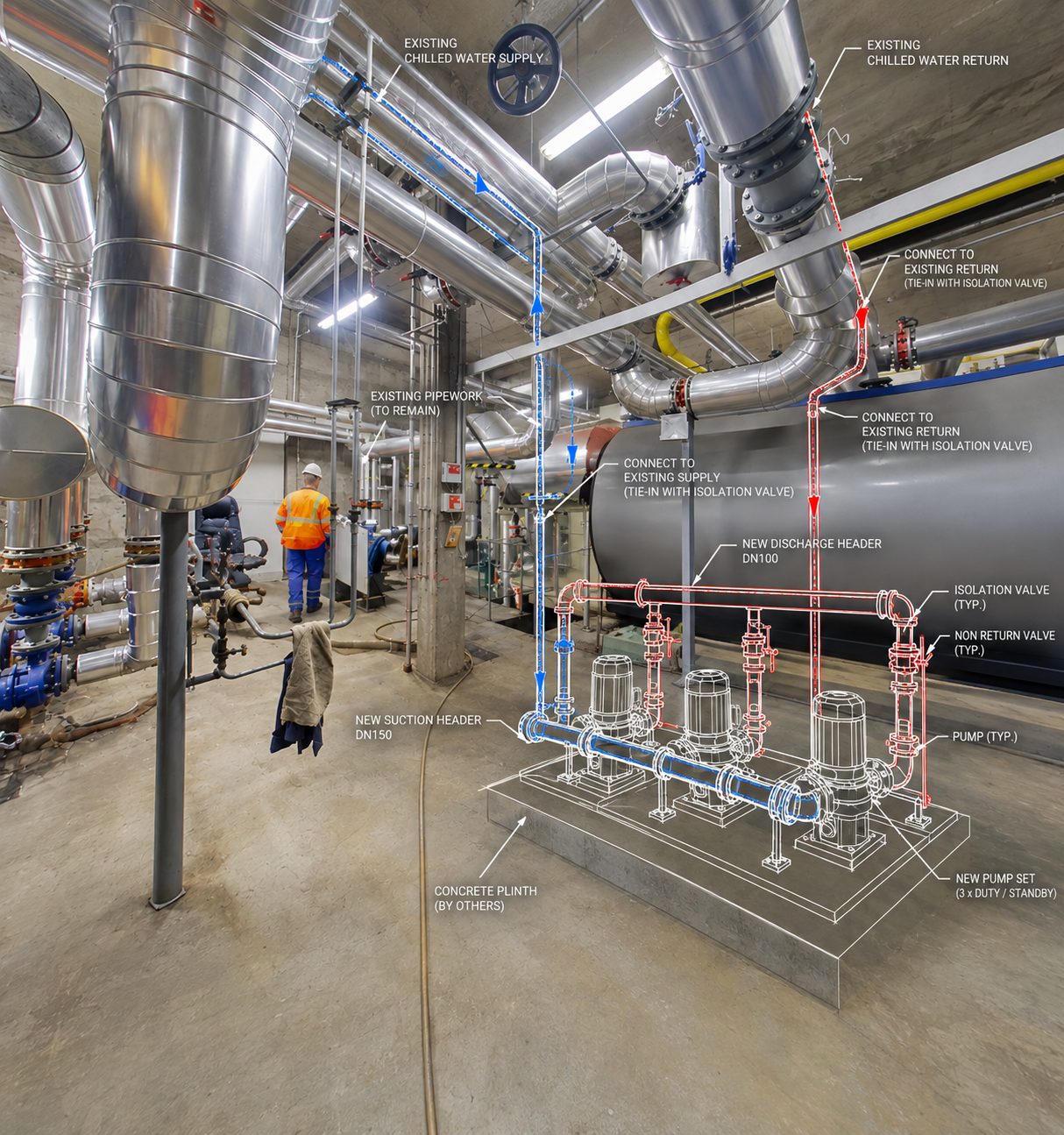
From BIM Model to Asset Information
A completed BIM model contains valuable information, but that information is only useful when it is structured around the client's operational requirements.
Our COBie and asset data services help organise information about equipment, systems, spaces and maintainable assets so it can be transferred from the project team into the owner's operational environment.
We work with project BIM models, schedules, specifications and handover requirements to structure the required information consistently and prepare it for delivery.
What We Deliver
COBie Data
Prepare and structure COBie information for spaces, systems, components, equipment and associated asset information according to project requirements.
Asset Information
Populate relevant asset parameters such as identification, manufacturer, model, location, warranty and maintenance information where available.
BIM Asset Data
Structure non-geometric information within Revit models so important assets can be identified, scheduled and managed.
Handover Information
Prepare organised digital information packages for transfer from design and construction teams to owners and facility management teams.
Our COBie & Asset Data Workflow
- 01
Information Requirements Review
Review the project's EIR, AIR, client requirements, BIM standards and handover specifications to establish what information is actually required.
- 02
Source Data Assessment
Review BIM models, equipment schedules, specifications, manufacturer information and other available project data.
- 03
Asset Identification
Identify relevant spaces, systems, equipment and maintainable components that form part of the asset information scope.
- 04
Data Population
Populate required parameters and asset information within the BIM environment and agreed handover datasets.
- 05
COBie Structuring
Organise the required information into the appropriate COBie structure and project-specific data requirements.
- 06
Validation & QA/QC
Check information for completeness, consistency, naming, relationships and required fields before final delivery.
What Asset Information Can Include
Depending on the project requirements and available source information, asset data can include:
Asset ID
Unique identifier for the asset.
Asset Type
Classification or type information for the component.
Manufacturer
Manufacturer or supplier information where available.
Model / Product Reference
Product model or reference number.
Serial Number
Unique equipment identification where available.
Location
Building, floor, room or space information.
System Relationship
Relationship between equipment and the systems they form part of.
Warranty Information
Relevant warranty details where provided.
Maintenance Information
Operational or maintenance information where required.
COBie & Revit
Keep asset information connected to the model.
Where appropriate, required asset information can be structured within the Revit model so that it can be scheduled, reviewed and transferred as part of the project handover workflow.
- BIM Model
- Asset Parameters
- COBie Data
- Digital Handover
- Facilities Management
The exact information structure is based on the project's requirements rather than adding unnecessary parameters to every model element.
Asset Data for Different Project Stages
Design
Establish the information structure and required asset parameters early in the project.
Construction
Populate and update asset information as equipment, products and systems become defined.
Commissioning
Incorporate available verified information for installed assets where included within the project scope.
Handover
Validate and organise the final information for transfer to the owner or facilities management team.
Operations
Provide structured information that can support future asset management and maintenance workflows.
Information Quality Matters
A COBie file containing thousands of incomplete or inconsistent fields is not necessarily a successful handover. Our QA/QC process focuses on:
Completeness
Required information is populated where source data is available.
Consistency
Naming, types, parameters and values follow the agreed project standards.
Accuracy
Information is checked against available BIM models and source documentation.
Relationships
Assets are associated with the appropriate spaces and systems.
Usability
The final information is structured around its intended operational purpose.
Where information is unavailable or cannot be verified from the supplied project data, it should be identified as unavailable rather than assumed.
Asset Information for Facilities Management
Give facility teams information they can actually use.
Structured asset information can help facility teams locate and understand important building components without having to search through large construction datasets.
Asset Identification
Find specific equipment and maintainable components.
Maintenance Planning
Access available equipment and maintenance information.
Replacement Planning
Understand installed equipment and product references.
Space Management
Associate assets with their physical building locations.
Future Projects
Use reliable existing information when planning refurbishment or upgrades.
COBie Data Validation
Before handover, asset information can be reviewed against the agreed project requirements. Typical checks can include:
- Required fields
- Asset naming
- Component types
- Locations
- System relationships
- Manufacturer information
- Model references
- Serial numbers
- Warranty information
- Data consistency
- Missing information
This provides a final quality check before the information is transferred to the client.
Typical Deliverables
COBie Data
Structured COBie information prepared according to project requirements.
Asset Registers
Organised records of equipment and maintainable assets.
Asset-Rich BIM Models
Revit models containing relevant non-geometric asset information.
Equipment Schedules
Structured schedules containing required equipment information.
Asset Parameter Population
Required project parameters populated within the BIM model.
Handover Data Packages
Organised digital information prepared for client and facilities management use.
Data QA/QC Reports
Documentation identifying information quality, completeness and outstanding issues where required.
Built Around the Client's Requirements
Not every project requires the same asset information. Our workflow starts with understanding what the client needs to operate and maintain the building, then works backwards to determine what information needs to be captured and structured.
- Design
- Construction
- Handover
- Operation
COBie & Asset Data Services
Hashtech provides COBie and asset data services for contractors, BIM teams, consultants, developers and building owners requiring structured digital handover information. We prepare COBie data, asset registers, BIM asset information and Revit parameter data from project BIM models, equipment schedules, specifications and available manufacturer information.
We can support the preparation and validation of asset information for MEP equipment, mechanical systems, electrical equipment, plumbing systems, fire protection assets and other maintainable building components within the agreed scope.
Frequently asked questions
What is COBie?
COBie is a structured information exchange format used to organise information about building assets, spaces, systems and components for handover and operational use.
What is the difference between COBie and BIM?
BIM is a broader methodology and information environment covering geometry, data and processes throughout a project's lifecycle. COBie is one structured way of delivering specific building and asset information, particularly for handover and facilities management.
Can you prepare COBie from a Revit model?
Yes. Relevant information can be extracted, structured and validated from a Revit model, provided the required asset information has been appropriately populated.
What asset information can you populate?
Depending on project requirements, this can include asset IDs, manufacturer, model numbers, serial numbers, locations, system relationships, warranty information and maintenance-related data.
Can you work with an existing BIM model?
Yes. We can review an existing Revit or other BIM model and populate or restructure the required asset information where the model and source data support it.
Do you provide asset registers?
Yes. Asset registers can be prepared alongside BIM and COBie deliverables where required.
Can you validate COBie data?
Yes. We can review COBie information for completeness, consistency, naming, relationships and other project-specific requirements.
Do you provide facilities management software?
No. Our service focuses on BIM and structured asset information preparation. The final information can be prepared for transfer into the client's chosen CAFM, CMMS or facilities management environment where the required format is known.
Have BIM data that needs to become useful asset information?
Structure your project information for the building's next stage: operation.
We’ll reply within one working day with questions, or with a scope and fee.